

How to select the related slider?
From wp-admin select the 3rd choice as you see in this screenshot
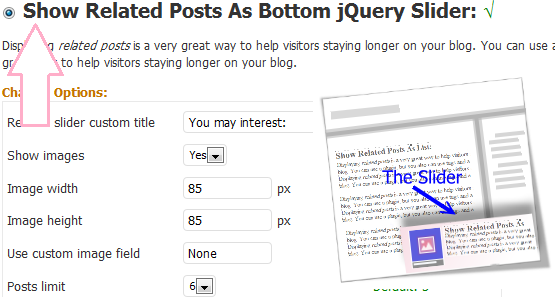
how to select the related slider? screenshot
The Related Posts plugin will output a series of “related” entries based on keyword matching. You can place this anywhere on your blog i.e. on the sidebarWatch Full Movie Online Streaming Online and Download

Increase your pageviews:
put it as a slider is too beautiful and will make your pageviews more and more
There is no wordpress blog does not need this type of plugins because users interest viewing more posts related to the current post, this will increase your page views/day and also increase your revenue

Improve your seo score in Google and Yahoo and other SE’s:
Our plugin displaying related posts in a very great way to help visitors staying longer on your blog. You can use this plugin to increasing the page rank of your internal posts to improve your SEO score

Finally:
Displaying related posts in a very great way to help visitors staying longer on your blog. using this mode will give your pages the perfect animation, it create a rotating content module. It works by creating “slides” of related posts and you have several options for customization



Hey There. I found your blog using msn. This is an extremely well written article. I’ll be sure to bookmark it and return to read more of your useful info. Thanks for the post. I will definitely return.
It is a wonderful plugin,I like it very much,but it can’t be support mutiple say to show the related post at the same time,
The problem with trying to get more visitors to monetize your site is that you need to get ranked on the first page of the search results. If you really want good results, try a guaranteed service like this one: http://bit.ly/JvnpBG
I am now not positive where you are getting your information, however good topic. I must spend a while studying much more or understanding more. Thanks for great information I was on the lookout for this info for my mission.
Fantastic goods from you, man. I have understand your stuff previous to
and you’re just extremely wonderful. I actually like what you’ve acquired here, really
like what you are saying and the way in which you say it.
You make it enjoyable and you still care for to keep it sensible.
I can’t wait to read much more from you. This is actually a
wonderful website.
Hi there, I discovered your site by the use of Google whilst looking for a related matter, your website came up, it looks great. I’ve added to my favourites|added to my bookmarks.