
you can install this plugin in a 5 easy steps:
- buy your copy from wp-buy.com plugins store buy and download
- Extract the contents of the .zip file to wp-content/plugins/ folder You should get a folder called aio-related-posts or any other name
or use your wordpress uploader:
login to your blog-url/wp-admin
Dashboard >> plugins >> add new >> upload >> slelect it >> install now >> activate
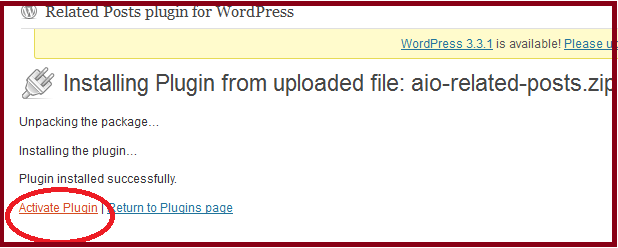
activation steps
- Activate the Plugin in WP-Admin.
- Goto Settings > All In One Related Posts to configure options.
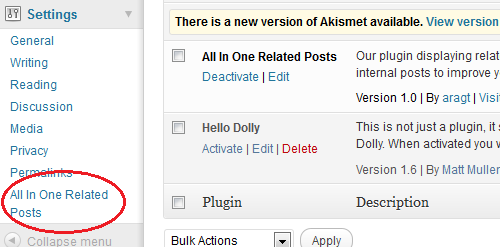
aio settings place
- You will find 3 modes, after choosing your mode make changes to its own options to match your needs and save the changes



download it from here
http://wordpress.org/extend/plugins/related-posts-list-grid-and-slider-all-in-one/
Hi,
I have installed your plugin and am getting this error.
Fatal error: Cannot use object of type WP_Error as array in /x/x/x/x/x/x/xwp-content/plugins/related-posts-list-grid-and-slider-all-in-one/the_globals.php on line 9
Any ideas? Using word press 3.3.1
try reinstalling it again!!
Found your website from Google, thank you for the informative read.
do you use the thumbnail feature of wordpress or not??
I saw this nice related posts option on a several sites, and have tried to code in html. After coding in html for a while, I have finally set this aside for later review. I had not the smallest idea of it being a plug-in. Now I have the plug-in installed, and it works fine, except Show Related Posts As List showing up at the end of each post, not in the sidebar. Same with Show Related Posts As Grid, the images don’t show up.
The Show Related Posts As Bottom jQuery Slider has a very neat effect and shows on the bottom page, including the thumbnail images. Is any way to insert the plug-in in the sidebar? I am using WordPress 3.3.1.
I’m really impressed with your writing talents and also with the structure on your weblog. Is that this a paid theme or did you customize it yourself? Anyway keep up the nice high quality writing, it is uncommon to see a nice blog like this one nowadays..
thank you, its a paId theme
Hands down, Apple’s app store wins by a mile. It’s a huge selection of all sorts of apps vs a rather sad selection of a handful for Zune. Microsoft has plans, especially in the realm of games, but I’m not sure I’d want to bet on the future if this aspect is important to you. The iPod is a much better choice in that case.
i got it and its work…. thanks…
My website is in three different languages and it shows related posts mixing different languages. What can I do to show -for example- on the English section only related posts in English?
The pluging looks pretty good, if I can fix that issue it will be great!
http://www.mystudentpathways.com
I don�t unremarkably comment but I gotta admit thankyou for the post on this great one : D.
All of these articles have saved me a lot of hesaechad.
Howdy! This is kind of off topic but I need some guidance from an established blog. Is it tough to set up your own blog? I’m not very techincal but I can figure things out pretty fast. I’m thinking about making my own but I’m not sure where to start. Do you have any points or suggestions? Cheers
Thank you, I have recently been looking for information approximately this subject for a long time and yours is the best I�ve found out till now. But, what in regards to the conclusion? Are you certain concerning the source? rent a car pristina
I know this if off topic but I’m looking into starting my own weblog and was curious what all is required to get setup? I’m assuming having a blog like yours would cost a pretty penny? I’m not very internet savvy so I’m not 100% positive. Any tips or advice would be greatly appreciated. Many thanks
You really make it seem so easy along with your presentation but I to find this matter to be actually one thing that I believe I might by no means understand. It seems too complex and very extensive for me. I’m taking a look forward for your next put up, I will attempt to get the hold of it!
i have installed this but it showing excerpts and i want to show full content what changes i can do?
I have the paid version of the plugin but I can only get one image and related post to show up on one of the posts. All the other posts say no related posts. What do I need to do?
your blog may have a little number of posts